Containers arrived with Reaper 7. I also use Ableton, and love Ableton's racks. I generally wish that Reaper's containers will eventually do all the nice things that Ableton's racks do:
Macros at the Container Level
Macros as part of the container, so that they can be saved and recalled. The container is the instrument or effect, from the user's perspective, not its constituent plugins. This means that a different container could have different macro assignments even for the same synth. Also we can then automate the macros.
- Example: consider having three layered plucks (e.g. trance arp), where we want to open the filter either by automating the cutoff, or by automating the sustain on the filter envelope. We could have three synths in a container in parallel, and have a single macro for either the cutoff or the filter envelope sustain (or the filter env sustain in one synth and the cutoff in another), and this is something we can then automate by automating a single macro. In addition, the range of the macro can be set so that the range 0.0..1.0 for the macro covers exactly the range we want to automate over in the synths.
- This really has to be implemented in the container itself and can't realistically be done by e.g. a Lua script.
- See also DevicePanel for a use of a control panel external to a plugin's interface.
MIDI Learn at the Container Level
In addition to having macros in the container, the container is a better place to put MIDI learn than in the plugin for most uses: that means a different container can have a different MIDI learn mapping. And MIDI Learn mappings can be saved and loaded as presets at the container level. This makes MIDI Learn uniform across plugins, albeit possibly slightly more fiddly to set up.
- The idea is that you do something like Ableton's configure mode. You touch controls, and they appear in a list. Possibly a touch-move-controller-auto mode, and a semi-auto mode. This semi auto mode is necessary for something like Zebra's XY controllers. In the case of Zebra, there are knobs so that we can touch either of the X and Y individually. But in general, if a plugin has an XY control where you can't touch one axis without touching the other, there needs to be a means to differentiate which one you want a controller to apply to.
- One thought here is that if you have a hardware synth like a Bass Station II or a Nord Rack 2X, you can have those knobs map to macros or parameters in a container. Quite possibly you'd want different profiles for each, so that when you load up a container and have a Rack 2X to hand, the knobs on the Rack 2X are automatically mapped to parameters; and if you have a Bass Station II, then those knobs are nicely mapped. (Omnisphere apparently does something like this.)
- It is unreasonable to expect that each and every plugin developer does this for each and every plugin. And the thing is, they don't. Implement it all at the container level, and the DAW user has a single Midi Learn system to learn, and the plug developer doesn't need to do anywhere near as much.
- When it comes to developers, something that would be good is to make every UI control accessible to some kind of event. (I'm not sure whether this is possible, if not it would be a good addition to CLAP to add the necessary facilities in the plugin API so that arbitrary events can be sent to a plugin, not just float parameter changes and MIDI messages.)
Multiple Chains and Internal Sends
Again this means that they can be saved and recalled in one step, rather than necessitating manually setting up extra tracks and routing. Send levels can then be automated, either directly, or via macros. See also AutoSends.
Also multiband processing, if made easy. That is, within a container, you have a multiband split and merge, with FX chains for each band. There are a few VSTs that do this, but the natural place is at the container level.
Modulators
Modulators like Bitwig: We can add e.g. an LFO or Envelope, or anything written in JSFX/EEL so that, for example, certain MIDI notes could trigger envelopes which then modulate plugin parameters.
MIDI Processing
Having MIDI processing before the synths. Possibly with the facility to send a MIDI event to a specific chain in a container. For synths in a container, the ability to, per synth, control which midi channels it receives (or even just to say midi channel 4 on the input goes to midi channel 1 on the synth). That way we can build multi-timbral containers using ordinary synths.
Workflow
The point of having all this in a container is that it can be loaded in a single step. This massively improves workflow. This then leads to another wish: AutoSubChannels.
Ableton and Bitwig's Racks
The other inspiration besides Ableton's and Bitwig's racks, is the organisation of instruments like Falcon. Here a container would correspond to Falcon's program. A program consists of multiple layers. In this case, a layer is a sub-container. Midi and other event flow proceeds from the top level down to the sub-containers, possibly being modified along the way. Then the audio goes back up to the top level, possibly being put through effects.
The General Idea
The general idea is to take a top-down look from the point of view of the user's workflow. If they want a configuration of tracks, synths, and plugins, and such, we waht:
- That they can be recalled as easily as a track preset. (Reaper is pretty good already here.)
- That they can specify exactly what and how they want to automate synths, with minimal effort.
- When it comes to things like sidechaining, sends, and MIDI, the ease of just saying 'grab the MIDI from here' or 'grab the audio from there', rather than manually creating tracks and sends, improves things. An annoyance with Ableton, for example, is that when you want to get the MIDI out of a plugin, that plugin needs to output Audio (else Ableton won't load it, which sucks), and then you have to put it in an instrument track, create a new track, and set that new track's MIDI input to the MIDI output of the plugin in question, which sucks). In the case of Reaper, many things require at least the creation of extra channels and/or tracks. If I want to capture the MIDI at a certain point in an FX chain, I have to split the track and FX chain into two, create sends, and such.
Auto Sub Channels
When we create a multitimbral plugin, say Falcon, we have the facility to automatically create MIDI input and audio output tracks. These are regular Reaper tracks like any other. What would be convenient is to have these extra tracks considered part of the main track, rather than individual tracks. This is just a workflow thing: at present the tracks must be manually organised into folders, when the common case is that the MIDI and audio channels are a logical part of the multitimbral synth's track.
Auto Sends
If I want to sidechain a compressor, I have to manually set up a chain, and can only do so from the output of another channel. Now, if we wish to e.g. sidechain a compressor to e.g. a kick in another track, but want to take the signal from part of the FX chain, we have to split the track's FX chain into two separate tracks, disable the parent send on the first, and send it to the second (or make it a sub-track of the first), and manually create a send from the first track to a spare set of channels on the track with the compressor. Likewise with MIDI.
This is too awkward to be worth the effort in most cases. But in Ableton and Bitwig it is easy: we can select the source of the sidechain from a menu and, within Ableton, we can select where in the chain we want to take it from.
On a signal-processing level, this is possible, since we can do it manually. But the wish is to make it automatic.
In addition, being able to add a plugin (even JSFX), and being able to just select inputs and a send source for them, rather than manually creating new channels and track sends, would be nice.
Bitwig
Consider this example from Bitwig (this is a screenshot from Protoculture's Trance Takover 2023 tutorial):
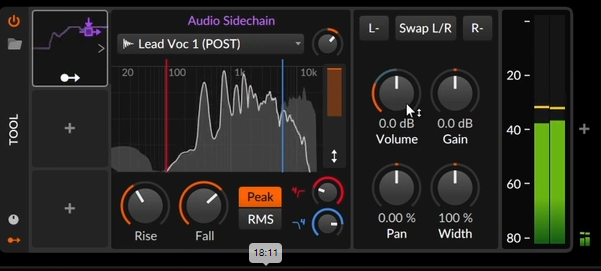
Here we just select the source channel in a dropdown and everything else is automatically done for us. If we deselect a source channel, the send is removed. This makes for a far quicker workflow than we have in Reaper.